
Get more clicks on
every upload.
Score your YouTube title and thumbnail or your TikTok hook before you post, get rewrites tuned to the platform, and see what's working in your niche. Blog headlines and email subject lines work too.
A score and useful feedback in about 10 seconds. No account needed to try.
Also free:Thumbnail previewCTR calculatorAll 16 tools
Three steps, about a minute.
Nothing to install and nothing to configure. The browser extension is optional — it just saves you the copy-paste.
Paste your title, hook or thumbnail
Drop in a YouTube title, a TikTok hook or a thumbnail (a blog headline works too), or let the browser extension grab it for you right on YouTube.
Get scored, not guessed at
The engine rates click-through potential, emotion and curiosity, then names the specific words and choices costing you clicks.
Publish the winner
Pick from the rewrites and thumbnail concepts, publish, then see whether the score held up against your real CTR.
A score you can check.
A Clks Score is an AI prediction, so we don't ask you to take it on faith. We line each score up with what your video actually did.
Every score is saved
Each title you analyze is kept with the score it got, so there's something to check once the video is live.
Then compared to your real CTR
A week after you score a title, we ask how it did. On Pro and Creator, connect your YouTube channel (read-only) and we read the CTR for you.
Test the top three on YouTube
Running YouTube's A/B test? Pick three titles worth testing here, then record which one YouTube kept and whether it was our top pick.
Free, and actually free.
No trial clock, no card on file, nothing that quietly starts charging you. Upgrade only when ten analyses a month stops being enough.
Full analyses every month
Not a preview — the whole report each time: score, weaknesses, five rewrites, thumbnail concepts, keywords and the audience the title will pull. The count resets every month.
No card on the free plan
You never enter payment details to sign up, and nothing upgrades itself. Paid plans start at $7.99/mo if and when you decide you want one.
Name, email, password
That is the entire form. Your data is encrypted in transit and never sold, ad measurement only runs if you allow it, and you can delete the account and everything in it from your profile at any time.
Make the subject stand out.
A thumbnail concept for a Minecraft aquarium video: a closer subject, brighter contrast, and a short, readable hook.
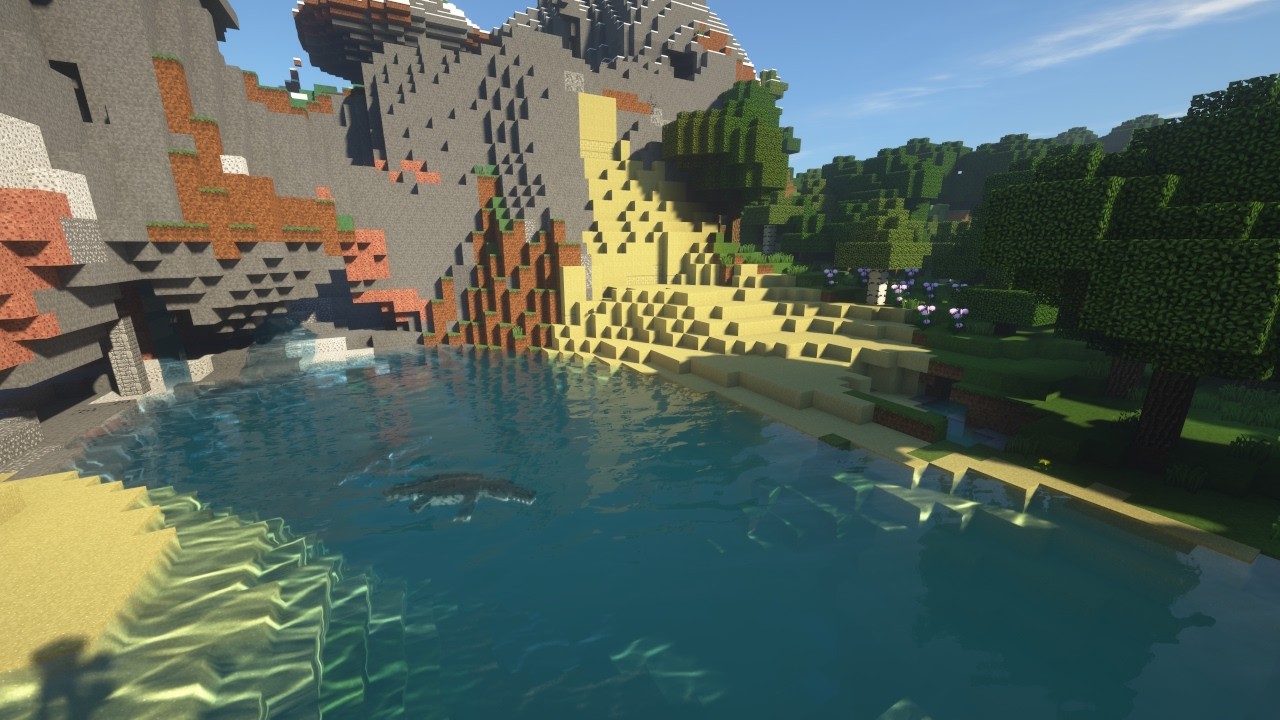
The scene takes the spotlight; the creature is easy to miss.

A clear focal point and two-word hook make the idea easier to read.
Design comparison only. No measured increase in clicks or views is claimed. Always match the thumbnail to what your video delivers.
Get feedback on your own thumbnail Get feedback on your own thumbnail See yours in a YouTube feedEverything that decides the click.
Built for YouTube and TikTok creators first. Bloggers, newsletter writers and marketers use the same scorer for headlines and subject lines. Laid out by the plan each tool comes with.
Before you sign up.
Short answers to what people ask before making an account.
Is the free plan actually free?
Yes. Ten full analyses every month, no card, no expiry date. The count resets monthly and nothing upgrades itself.
What does a Clks Score measure?
A 1–100 rating of a title's click-through potential — how specific it is, the emotion it carries and the curiosity it creates — along with the exact words holding it back. Use it to compare drafts. It isn't a promise of views.
Do paid plans have a free trial?
Can I cancel anytime?
Yes — Profile, then Cancel subscription. You keep access until the end of the period you've paid for, and new subscribers can get a full refund within 7 days of their first payment.
Does it work for TikTok, or only YouTube?
Both. Tell us what you publish and every score and rewrite follows that platform's rules: YouTube titles and thumbnails, TikTok hooks and covers. Blog headlines and newsletter subject lines work too. Reading your real CTR automatically needs a connected YouTube channel.
Score your next title before it goes live.
10 free analyses a month · No card · Upgrade only if you want to
Create your free account
Three fields. No card. About thirty seconds.
10 full analyses every month. Free forever. No payment details.
Your data is encrypted in transit and never sold.
Already have an account? Log in
📊 YouTube Analytics
Your latest uploads, with the numbers that decide whether people click.
Title Tests
Pick three titles worth putting in YouTube's A/B test, then record which one YouTube kept. Every finished test checks whether our top pick really wins.
YouTube keeps whichever title earns the most watch time, so every title has to be honest about the video.
👤 Your account
Unused credits don't roll over—
⚙️ Account settings
Retunes every score and suggestion for that platform
Improves your scores over time
📜 Your agreements
You accepted these when you created your account. They apply to your use of ClksOptimal.
🛟 Get help
Stuck or found a bug? Message our support team.
⚠️ Delete account
Permanently deletes your account, all your data, and immediately stops any active subscription. This cannot be undone.
Pick your plan
Start free, upgrade whenever you're ready.
Secure checkout
You'll enter your payment details on Stripe's secure checkout page — cards, Apple Pay, and Google Pay all supported.
Order summary
Renews automatically until you cancel. Cancel anytime from your profile; you keep access until the end of the period you've paid for. New subscribers can get a full refund within 7 days of their first purchase. Have a promo code? Enter it on the next page.
Welcome back
Pick a tool to start optimizing.
Title Analyzer
Paste any title, headline, caption, or subject line. Get a Clks Score, emotion & curiosity ratings, 5 rewrites, visual ideas, keywords, audience, and weaknesses.
Optional, but it makes the score a lot more accurate.
✨ Suggested titles
🖼️ Thumbnail ideas
🔑 Keywords
👥 Predicted audience
⚠️ Weaknesses
Get the ClksOptimal extension
Clks Scores right inside YouTube. Score any video's title, get instant rewrites, and review your own uploads from YouTube Studio — without leaving the page.
Add to Chrome — FreeAdd to Chrome
Click the button above, then choose Add extension when Chrome asks.
Pin it & log in
Click the puzzle-piece icon in your toolbar and pin ClksOptimal. Then click the icon and log in with your account.
Start scoring
On any YouTube video, hit the Clks Score button. In YouTube Studio, click the ClksOptimal badge on any thumbnail for a full review — title, thumbnail, tags, and description tips.
Works in Chrome, Edge, Brave, and Opera. Manual install
Before you go…
You'll lose access to: